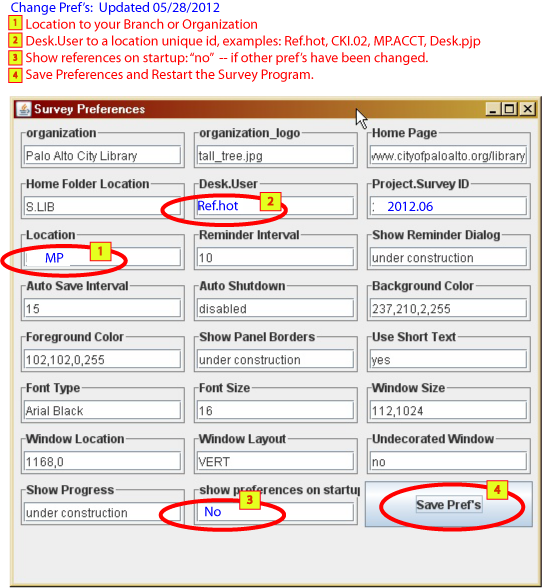
- organization -- informational
- organization logo-- informational -- use for thumbnail icon in Survey window
- Home Page-- informational
- Home Folder Location-- informational
- **Desk.User -- ex. Circ.Hot, Ref01, Desk.Pete, Wkrm.pjp -- just try to make it unique for your location.
- Project.Survey ID -- 2012.06 -- programmatically set (May change, keep advised)
- **Location -- your branch or department, e. g. MP, Main, TS, Admin
- Reminder Interval -- Popup reminds of inactivity, minutes
- Show Reminder Dialog -- yes/no option
- Auto Save Interval -- saves every x minutes
- Auto Shutdown -- under construction
- Background Colors -- use color chooser for easy selection
- Foreground Colors -- use color chooser for easy selection
- Show Panel Borders -- under construction
- Use Short Text -- saves real estate
- Font Type -- use any font available - Comic Sans, Verdana, Algerian, etc.
- Font Size -- point sizes
- Window Size -- remembers last size
- Window Location -- remembers last position
- Window Layout -- "VERT" Creates a vertical window, otherwise a horizontal window (xVERT)
- Undecorated Window -- users can opt out of Title bar and close buttons ("chrome")
- Show Progress -- under construction
- show preferences on startup -- initially set to show, reminds user to set important preferences.
Preferences' Definitions
** Important settings to change prior to survey start